• Skip to primary navigation
  • Skip to main content
  • Skip to footer

Top Header bar

(888) 510-3453 [email protected] DEMO DYNAFILE
DynaFIle

DynaFile

Scan to Cloud HR Document Management Solutions

  • Tour
  • Solutions
    • Human Resources
      • Electronic Employee Onboarding
      • Electronic Employee Files
      • HR Employee File Management
    • Education
      • Electronic Education Onboarding
      • Electronic Education Files
      • Education File Management
    • Healthcare
      • Electronic Healthcare Onboarding
      • Electronic Healthcare Files
      • Healthcare Filing Management
    • Accounting
    • Contract Management
    • Manufacturing & Distribution
    • Real Estate
    • Staffing
    • Other Solutions
  • Features
    • Meet AIDI
    • Cloud Workflows
      • Electronic Signatures
      • Secure File Sharing
      • Version Control
    • Cloud Storage
      • Document Indexing
      • Document Retrieval
      • Segmented Access
      • Drag and Drop Drive
    • Scanning Automation
      • Barcode Recognition
      • Batch Processing
    • Automated Onboarding
    • Seamless Integrations
  • Compliance
  • Resources
    • Case Studies
    • ROI Calculator
    • Press Releases
    • HR Guides
      • HR DMS Buyer’s Guide
      • Cloud-Based HR Document Management
      • HR Records Management Best Practices
      • Onboarding with Cloud HR Filing
      • Document Storage vs. Management
      • Digitize HR Paper Files
      • HR Compliance Checklist
    • Blog
    • FAQs
  • Company
    • Advocacy Program
    • Customers
    • Partners
    • History
    • Careers
    • Contact Us
    • Security & Certifications

Record Compliance

Insider Threats in HR: When Trust Fails, and Data Leaks Begin

June 3, 2025 by Andrew Roberts

How internal breaches are putting employee data in jeopardy


The Growing Threat of Insider Data Breaches in HR

Cybersecurity threats are no longer limited to faceless hackers from outside an organization. In many cases, the danger is much closer to home. A former employee, a disgruntled team member, or even a simple internal misstep can expose your organization to significant risks. These insider threats can compromise everything from employee files to payroll records, putting your compliance, reputation, and operations in serious jeopardy.

No industry is safe. In fact, DynaFile serves industries such as education, healthcare, human resources, aviation, legal, financial services, and others where secure document management is critical. Consequently, regardless of your field, insider breaches are becoming increasingly common, sophisticated, and damaging.

Real Incidents That Hit Close to Home

Here are several recent examples of insider-related data breaches. Specifically, these incidents demonstrate how both intentional misuse and internal errors can lead to severe consequences. Therefore, they underscore the importance of secure document controls, strict access policies, and a robust offboarding process.

Pegasus Airline Employee Exposes 23 Million Files

An employee at Pegasus Airlines improperly configured a cloud storage bucket, making confidential flight charts, crew data, plaintext passwords, and other sensitive materials accessible online.

900 U.S. Schools Impacted by Student Data Breach

The National Student Clearinghouse confirmed a breach caused by a compromised file transfer tool. As a result, student data from nearly 900 schools was exposed because internal access controls were not properly managed.

Credit Union Employee Deletes 21 Gigabytes in Retaliation

Following the employee’s termination, they deleted 21 gigabytes of data, including customer mortgage files and anti-ransomware tools. As a result, the credit union experienced significant business disruption.

Disney Accuses Fired Employee Of Hacking Menus

A terminated employee allegedly gained unauthorized access to the menu systems of a global entertainment company, modifying allergen data on its platform. This act of retaliation could have posed serious health and legal risks.

Twitter/X Insider Leaks 2.8 Billion Profiles

A disgruntled former employee allegedly leaked a massive data dump containing 2.8 billion Twitter profiles. The exposed data included user information dating back to the platform’s early days.

Kill Switch Attack Cripples Ohio Software Firm

An ex-employee of an Ohio-based company deployed a “kill switch” malware after being restructured out of their role. The sabotage caused major disruptions and significant recovery costs.

Internal Misconfiguration Exposes 31 Million Patient Records

A massive healthcare breach occurred when a medical software platform failed to properly configure its security settings, resulting in more than 31 million patient records being publicly accessible. The exposure did not stem from malicious intent but instead resulted from an internal oversight. This breach example serves as a clear reminder that insider threats can arise from negligence just as easily as from deliberate actions.

Supporting Research: Insider Threats Are Rising

Recent research from Binghamton University found that organizations are significantly more vulnerable to data breaches during layoffs or staff transitions. Improper offboarding was a significant factor in elevated risk.

Additionally, a report from Security Info Watch revealed that 44 percent of organizations experienced an increase in insider threat activity over the past year, particularly associated with employee exits.

CIMCOR also tracks internal breach cases across sectors, showing that human error and negligence remain leading causes of exposure.

HR’s Role in Preventing Insider Breaches

Human Resources departments manage some of the most sensitive records in an organization. When internal systems lack proper controls or monitoring, they become easy targets for exploitation. Whether intentional or accidental, insider errors can lead to significant compliance violations and costly incidents.

Common vulnerabilities include:

  • Poor or delayed offboarding procedures
  • Unsecured or misconfigured cloud storage
  • Lack of visibility into file access and activity
  • There is no system for tracking employee permissions or usage

These risks increase in environments that rely on outdated paper-based processes or generic cloud storage platforms lacking HR-specific safeguards.

How DynaFile Stops Insider Threats Before They Start

DynaFile is a secure cloud-based document management system built for HR and operations teams. It helps organizations take control of sensitive files and reduce the risk of insider threats through key features designed for proactive protection.

  • Granular Role Permissions: Only authorized team members can access specific files based on their department, role, or credentials. This granular control limits exposure and keeps data protected.
  • Complete Audit Trails: Audit trails provide a real-time record of file access and activity, promoting accountability and facilitating the early identification of suspicious behavior.
  • Automated Offboarding Workflows: No manual steps are required, and access is immediately revoked upon an employee’s departure, reducing the risk of oversight or delay.
  • Secure Cloud Configuration: DynaFile’s cloud environment utilizes encryption, strict authentication, and configuration protocols to prevent accidental exposure or unauthorized file access.

Ready to Lock Down Your HR Files?

Insider threats continue to grow. Consequently, if your HR team is still using paper files, shared drives, or outdated systems, you may be exposing your organization to avoidable risk.

With DynaFile, you can:

  • Protect sensitive employee and organizational data
  • Automate access controls and offboarding procedures
  • Reduce your exposure to internal and external threats
  • Ensure compliance with data privacy regulations like HIPAA, FERPA, and GDPR
  • Tailor access controls, permissions, and audit capabilities to your specific industry, policies, and audit requirements
  • Streamline your HR workflows securely

Every organization is different. DynaFile offers a highly customizable solution that fits the way your team works and supports your specific document management needs.

Take control before an insider does. Schedule your demo today.

Insider Threats and HR Security: FAQs

Q: What is an insider threat in HR?

An insider threat is a risk that originates from within an organization. A current or former employee, contractor, or partner with access to internal data can misuse it, either intentionally or by mistake.

Q: Why are HR documents vulnerable to insider threats?

A: HR departments manage sensitive files, including employee records, payroll details, benefits, compliance documents, and performance data. Lax access control puts this information at risk of theft or misuse.

Q: How does DynaFile help mitigate insider threats?

A: DynaFile offers role-based permissions, audit trails, automated offboarding workflows, and encrypted storage. These features work together to prevent unauthorized access and maintain complete visibility over document usage.

Q: What industries benefit most from secure HR document management?

A: Education, healthcare, aviation, legal, staffing, real estate, and financial services are especially at risk. However, any organization handling sensitive employee information should implement a secure solution.

Q: What should HR teams include in their offboarding process?

A: Access should be revoked immediately, accounts should be disabled, and all related document permissions should be reviewed. DynaFile makes this process easy with automation and real-time updates.

Sources

  • “Mass Data Leak of 2.8 Billion X and Twitter Profiles” – CPO Magazine https://www.cpomagazine.com/cyber-security/mass-data-leak-of-2-8-billion-x-and-twitter-user-profile-may-have-been-work-of-disgruntled-former-employee/
  • “Ex-Employee Found Guilty in Revenge ‘Kill Switch’ Scheme” – Dark Reading https://www.darkreading.com/cyberattacks-data-breaches/ex-employee-guilty-revenge-kill-switch-scheme
  • “Disney Employee Hacked Menus After Termination” – Forbes https://www.forbes.com/sites/larsdaniel/2024/10/30/disney-employee-hacked-menus-after-termination-in-alleged-revenge-plot/
  • “Fired NY Credit Union Employee Nukes 21GB of Data in Revenge” – Bleeping Computer https://www.bleepingcomputer.com/news/security/fired-ny-credit-union-employee-nukes-21gb-of-data-in-revenge/
  • “900 US Schools MOVEit Hack Student Data Exposed” – HackRead https://hackread.com/900-us-schools-moveit-hack-student-data-expose/
  • “Layoffs Increase Risk of Data Breaches, Study Shows” – Binghamton University https://www.binghamton.edu/news/story/5024/layoffs-data-breaches-cybersecurity-risk-business-research-binghamton-university
  • “When Employees Leave, Risk Remains” – Security Info Watch https://www.securityinfowatch.com/cybersecurity/article/55290068/when-employees-leave-risk-remains-the-growing-threat-of-insider-breaches
  • “Internal Data Breach Examples” – CIMCOR https://www.cimcor.com/blog/internal-data-breach-examples
  • “31 Million Patients’ Details Exposed” – LinkedIn https://www.linkedin.com/pulse/31-million-patients-details-exposed-medical-software-diachenko/

Filed Under: Digital Transformation, Electronic Filing, Record Compliance

After the Breach: What Schools Can Learn from the PowerSchool Cyberattack

May 20, 2025 by Andrew Roberts

Why Secure Document Management Is Critical for Cybersecurity in K-12 and Higher Education


education document management cybersecurity

In December 2024, PowerSchool, a widely used student information system, suffered a significant cybersecurity breach. Hackers gained unauthorized access to the PowerSource customer support portal, exploiting compromised credentials and the absence of multi-factor authentication. This breach exposed personal data of students and staff across numerous school districts in the U.S. and Canada, including names, addresses, Social Security numbers, medical records, and academic information.

In an attempt to mitigate the damage, PowerSchool paid a ransom to the attackers, who provided a video purportedly showing the deletion of the stolen data. However, this assurance proved unreliable. By May 2025, multiple school districts reported receiving new extortion demands from the same threat actors, indicating that the data had not been destroyed as promised.

The Fallout: Schools Under Siege

The breach’s repercussions have been widespread. On Long Island, over 20 school districts experienced cyberattacks, compromising the personal data of more than 10,000 students. Similarly, the Toronto District School Board confirmed receiving extortion communications, with the attackers threatening to release stolen data unless the schools paid additional ransoms.

These incidents have not only jeopardized the privacy of students and staff but have also strained the resources of educational institutions, many of which lack the infrastructure to respond effectively to such threats.

The Imperative: Strengthening Cybersecurity in Education

DynaFile makes it easy to locate any file using cross-reference searching by employee, document type, department, or location. Whether preparing for an audit, updating an employee’s records, or retrieving a signed policy acknowledgment, you can find the right document instantly. The PowerSchool breach is a stark reminder of the critical importance of cybersecurity in educational settings. Schools must adopt comprehensive security strategies to safeguard sensitive information and maintain trust. Key measures include:

  • Implementing Multi-Factor Authentication (MFA): Adding an extra layer of security to prevent unauthorized access.
  • Regular Security Audits: Conducting periodic assessments to identify and address vulnerabilities.
  • Employee Training: Educating staff about phishing scams and safe data handling practices.
  • Secure Document Management Systems: Utilizing platforms like DynaFile to effectively manage and protect digital records.

As the best-in-class education document management system, DynaFile is trusted by schools, districts, and institutions to simplify the complex demands of managing employee, faculty, staff, and student files. It provides secure, FERPA-compliant cloud storage for student records, HR files, and administrative documents, all organized through customizable metadata and access permissions. With role-based security controls, audit-ready reporting, and automated file retention policies, DynaFile protects sensitive data and helps schools fully comply with privacy regulations. Seamless integrations with SIS, HRIS, and e-Signature platforms reduce human error and ensure critical records are stored securely.

By adopting a secure document management system like DynaFile, schools can take proactive steps toward better cybersecurity while creating a smoother, more efficient way to handle records behind the scenes.

Final Thought

Cyberattacks like the PowerSchool breach are no longer rare events. For schools, safeguarding sensitive records is not just about IT but about protecting trust. By combining innovative policies with secure platforms like DynaFile, educational institutions can strengthen their defenses, support compliance, and keep student and staff data safe in an increasingly digital world.

Want to learn how DynaFile can help your school secure education records and boost compliance? Schedule a customized demo today!

Education Cybersecurity & Document Management: FAQ

Q: What types of documents can schools manage with DynaFile?

A: DynaFile supports secure storage and routing for student records, IEPs, consent forms, enrollment documents, HR files, credentialing paperwork, and more, all in one centralized platform.

Q: Is DynaFile compliant with FERPA and HIPAA?

A: Yes. DynaFile helps institutions meet strict data protection requirements with audit trails, access controls, and cloud infrastructure designed for compliance with FERPA, HIPAA, and other regulations.

Q: Can DynaFile integrate with our existing systems?

A: Absolutely. DynaFile integrates with many SIS, HRIS, and e-signature platforms like Adobe Acrobat Sign and DocuSign to streamline workflows and reduce manual data entry.

Q: How does DynaFile improve cybersecurity for schools?

A: By eliminating paper files and scattered digital folders, DynaFile centralizes sensitive data in a secure cloud environment. Features like role-based access, document tracking, and automated retention reduce risk and improve accountability.

Q: Does DynaFile support remote or hybrid school environments?

A: Yes. Staff can access records securely from anywhere, making it ideal for school districts with distributed teams or hybrid work policies.

Filed Under: Education Document Management, Record Compliance

Say Goodbye to HR Paperwork: Automate Onboarding Workflows with DynaFile and Adobe Acrobat Sign

May 13, 2025 by Andrew Roberts

Discover how HR teams are streamlining onboarding workflows, improving compliance, and going paperless with a seamless integration between DynaFile and Adobe Acrobat Sign.


automated HR onboarding workflows with e-Signature integration

Paperwork is one of the most significant barriers to efficient HR operations. From chasing down signatures to uploading documents manually, it is easy for critical tasks to fall through the cracks. These inefficiencies not only waste time but also create compliance risks and employee frustration.

That is why organizations across industries, including education, healthcare, legal, real estate, and human resources, are turning to digital solutions that eliminate paperwork and simplify processes. DynaFile’s integration with Adobe Acrobat Sign delivers exactly that. It helps teams automate onboarding workflows, reduce risk, and manage employee files with greater speed and control.

Automate Employee Onboarding Workflows from Start to Finish

Employee onboarding often requires dozens of documents, signatures, and updates across different systems. Without the right tools in place, essential employee data can become siloed or misfiled. Even after documents are signed, it’s common for them to be stored separately from the employee’s digital record, increasing the risk of errors or incomplete files.

Now, with DynaFile and Adobe Acrobat Sign, HR teams can close that gap. When a new hire signs documents using Adobe Acrobat Sign, those files are automatically routed into DynaFile’s secure cloud repository. A folder is created for the employee, and each file is indexed using metadata-based indexing with automatic data synchronization from your HRIS or system of record.

The integration creates a seamless connection between signature capture and digital file storage. There’s no need for manual uploads of signed documents, saving HR teams valuable time.

Find What You Need, When You Need It

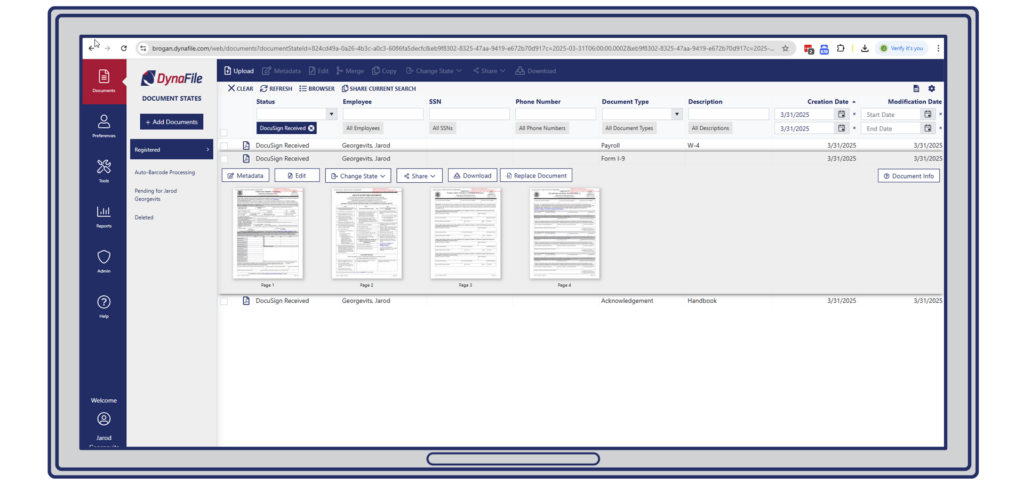
DynaFile makes it easy to locate any file using cross-reference searching by employee, document type, department, or location. Whether preparing for an audit, updating an employee’s records, or retrieving a signed policy acknowledgment, you can find the right document instantly.

From there, HR teams can trigger additional workflows or compliance steps. This level of visibility and control transforms onboarding into a reliable, repeatable process.

Why Adobe Acrobat Sign is the Right e-Signature Solution for HR

Adobe Acrobat Sign allows employees to sign documents securely from any device. This flexibility is essential for HR departments that manage remote, hybrid, or distributed workforces.

Beyond convenience, Adobe Acrobat Sign also supports compliance with industry regulations, including:

  • HIPAA (Health Insurance Portability and Accountability Act)
  • FERPA (Family Educational Rights and Privacy Act)
  • GLBA (Gramm-Leach-Bliley Act)
  • FDA 21 CFR Part 11 (Electronic Records and Signatures)

With built-in encryption, secure access, and full audit trails, Adobe Acrobat Sign ensures that every e-Signature is legally binding and tamper-proof. When combined with DynaFile’s automation capabilities, your HR documentation process becomes secure and compliant from end to end.

DynaFile Powers a Fully Digital HR Filing System

Highly customizable, DynaFile adapts to the unique needs of any sector. Whether you’re managing teacher onboarding in education, credentialing in healthcare, contract tracking in legal, or employee records in HR, DynaFile can support your workflow. While Adobe Acrobat Sign handles the secure e-Signature process, DynaFile brings structure, visibility, and automation to the entire document lifecycle. Key features include:

  • Barcode-powered automated document routing
  • Metadata-based indexing and folder creation
  • Automatic data synchronization from HRIS platforms
  • Role-based access controls for document security
  • Custom employee document retention policies
  • Audit reporting and file compliance checklists
  • Secure access from any location or device

Whether you are onboarding a new employee, responding to a compliance audit, or preparing annual reviews, DynaFile ensures every document is accurate, accessible, and secure.

A Smarter Way to Manage HR Documentation

This integration between DynaFile and Adobe Acrobat Sign is not just a feature upgrade but a smarter, faster way for HR teams to eliminate paperwork and simplify operations. From improving onboarding workflows to maintaining long-term compliance, this solution is designed for digital-first HR departments that must stay ahead.

If your team is still managing paper files or disconnected digital tools, now is the time to streamline your process.

Q: What is the benefit of integrating DynaFile with Adobe Acrobat Sign?

A: The integration creates a seamless digital workflow for HR teams by allowing documents to be signed electronically and then automatically routed into DynaFile’s secure cloud filing system. This eliminates manual uploads, reduces errors, and helps teams stay compliant with regulations like HIPAA, FERPA, and GLBA.

Q: Can this integration help with onboarding new hires remotely?

A: Yes. The DynaFile and Adobe Acrobat Sign integration is ideal for remote and hybrid teams. New hire forms can be signed from any device, anywhere, and are instantly filed in the correct employee folder within DynaFile.

Q: What types of HR documents can be managed using this integration?

A: Common documents include offer letters, onboarding packets, tax forms (like I-9s and W-4s), policy acknowledgments, benefits forms, performance reviews, training records, and more. These documents can be signed securely and automatically filed in the correct location.

Q: How does this integration support HR compliance?

A: The integration supports compliance through secure e-Signatures, automatic document indexing, and features like document retention policies, role-based access controls, and audit-ready file checklists. It helps organizations meet standards such as HIPAA, FERPA, GLBA, and FDA 21 CFR Part 11.

Q: Are there other e-Signature integrations available with DynaFile?

A: Yes. In addition to Adobe Acrobat Sign, DynaFile also integrates with other trusted e-Signature platforms, including DocuSign and PandaDoc. These integrations allow organizations to choose the solution that best fits their existing workflows and security requirements.

Explore the Integration Today

Schedule your customized demo to see how DynaFile and Adobe Acrobat Sign can help your HR team go paperless and stay audit-ready.

Book a Tour

Filed Under: Electronic Filing, Paperless Onboarding, Record Compliance, Workflow Integrations

Why Storing Education Data Isn’t Enough: The Shift to Smarter Document Management

May 5, 2025 by Andrew Roberts

Moving Beyond Raw Storage with Purpose-Built Document Management in Education


document management for education

Educational institutions are collecting more information than ever, but turning that data into action is a different story. From enrollment paperwork and financial aid forms to employee onboarding documents and compliance records, schools, districts, and universities are juggling massive amounts of files across departments. Yet many still rely on disconnected systems or generic cloud storage that are not designed for the complexities of education. To operate efficiently and stay audit-ready, institutions need more than a place to store files. They need a smarter way to manage them.

To remain efficient, compliant, and responsive, schools must shift their focus from basic storage to innovative education record management. A dedicated document management system for education offers the tools to organize, secure, and leverage information more effectively.

The Real Challenge: Disconnected, Underutilized Data

As education becomes increasingly digital, institutions face mounting pressure to manage information securely, efficiently, and intelligently. Whether it’s handling student enrollment records, faculty credentials, or compliance documentation, the volume and complexity of files continues to grow. But despite this shift, many schools still rely on outdated tools and manual processes that were never meant to keep up with modern demands. To improve operations, protect sensitive records, and reduce administrative strain, schools need more than cloud storage. They need a document management system built specifically for the education environment.

Why Cloud Storage Alone Is Not Enough

Cloud storage is useful for backups and large file hosting, but it is not built to handle the daily needs of HR and administrative teams in education. Managing employee files, student records, and compliance documents requires more than a shared drive.

Let’s compare:

Cloud Storage PlatformEducation Document Management System
Stores data onlyOrganizes files using metadata and categories
No built-in workflowsAutomates filing, approvals, and routing
Limited compliance toolsSupports FERPA, HIPAA, and audit readiness
Basic permissionsRole-based access control
Folder-based navigationSearchable, indexed digital file repository

A complete electronic filing system for education allows institutions to move away from manual processes and toward faster, more secure, and more accessible recordkeeping.

The Cost of Inefficiency in Education

Educational institutions are increasingly overwhelmed by the volume and complexity of data they must manage. A recent survey by U.K.-based researcher Vanson Bourne surveyed 1,200 IT decision-makers around the world and found that many schools face challenges related to data security, accessibility, and scalability. These obstacles often prevent institutions from managing their information efficiently or meeting long-term strategic goals.

Meanwhile, a study published by UCLA and the MIT Press revealed that many universities struggle to capture the full value of their data due to fragmented infrastructure and a lack of cohesive strategy. Despite having access to large volumes of information, colleges and universities often lack the tools and systems needed to integrate data sources and use them to inform decisions across departments.

These findings align with a recent EdTech Magazine article emphasizing the importance of improving data management in higher education. The article highlights the operational risks of outdated systems, paper-based workflows, and siloed file storage practices. Without a structured approach to document management, institutions face rising administrative burdens, limited visibility, and increased risk during audits or compliance reviews.

These challenges highlight the growing need for a centralized document management system built specifically for education. DynaFile helps schools and universities address these inefficiencies with scan-to-cloud automation, advanced file indexing, and seamless integration with existing SIS and HR platforms. The result is a secure, scalable, and audit-ready solution for managing both student and employee records.

What to Look for in an Education Document Management Solution

Whether managing onboarding documents, enrollment records, or academic credentials, educational institutions need tools that streamline daily tasks while maintaining security and compliance.

Here are key features to look for:

  • Scan-to-cloud conversion with barcode automation
  • Electronic onboarding for staff and students
  • Secure access permissions and version control
  • FERPA-compliant audit trails
  • SIS and HRIS platform integrations
  • Real-time reporting and customizable dashboards
  • Metadata tagging and quick search functionality

A strong document management solution will eliminate paper bottlenecks and give teams faster access to the information they need.

Why Schools Should Avoid DIY Document Systems

Some IT departments try to build internal filing systems using cloud storage or shared drives. While this may work temporarily, these solutions rarely scale. They often lack audit trails, file indexing, and access control. As institutions grow and face more complex compliance requirements, these limitations become serious liabilities.

A purpose-built education file management solution like DynaFile is designed to support staff, faculty, and students across campuses and departments. It simplifies the transition to digital records while improving visibility, automation, and security.

Conclusion: Managing Information With Purpose

Educational institutions are under pressure to do more with limited resources. Relying on outdated or generic tools to manage records can slow down processes, increase compliance risks, and waste valuable staff time.

A document management system for education provides the tools needed to digitize files, automate workflows, and centralize access in a secure, compliant environment. With DynaFile, schools can eliminate paper, simplify onboarding, support audits, and create smarter workflows that scale with their mission.

Q: Why isn’t cloud storage enough for education document management?

A: Cloud storage platforms are not designed to manage structured records or workflows. Schools need a document management system to securely organize, search, and control access to student and staff files while meeting compliance requirements.

Q: What is a document management system for education?

A: A document management system for education is a digital solution that helps schools and districts manage student and employee records. It includes tools for scanning, indexing, secure access, onboarding, and compliance reporting.

Q: What are the risks of DIY document management in schools?

A: DIY storage solutions often lack security, structure, and compliance features. These systems can lead to lost documents, inefficient workflows, and increased risk during audits.

Q: How does DynaFile improve education document management?

A: DynaFile provides scan-to-cloud automation, searchable digital filing, and integration with SIS and HR platforms. Schools use DynaFile to reduce paperwork, streamline onboarding, and keep records audit-ready.

Ready to Modernize Your Education File Management?

Schedule your customized demo to see how DynaFile helps schools and districts go paperless, stay compliant, and streamline onboarding and document workflows.

Book a Tour

Filed Under: Education Document Management, Electronic Filing, Record Compliance

Digital HR Workflows Made Easy: How DynaFile + DocuSign Simplify Employee File Management

April 7, 2025 by Andrew Roberts


Digital HR Workflows Made Easy: How DynaFile + DocuSign Simplify Employee File Management

Eliminate Paperwork and Simplify Onboarding with DynaFile + DocuSign Integration

This powerful integration streamlines how HR teams send, sign, and store employee documents, making file management easier, faster, and fully digital.

Manual paperwork continues to slow down HR teams. Chasing signatures, organizing files, and managing documents by hand takes time away from strategic work like employee engagement and compliance. But there’s a better way.

With the DynaFile + DocuSign integration, HR teams can streamline every step of the documentation process—from sending forms to storing completed files—automatically and securely.

In this post, we’ll walk through how the integration works, who it benefits, and why making the move to digital document management gives HR teams more time to focus on people, not paperwork.

The Hidden Cost of Manual HR Workflows

Manual HR processes may seem manageable at first, but over time, they quietly drain productivity, delay critical tasks, and increase compliance risks. From onboarding paperwork to signature requests, small inefficiencies compound quickly, especially for growing or multi-location teams.

According to CareerBuilder, two in five HR managers spend three or more hours manually collecting onboarding information for every new hire, and manual onboarding processes increase workloads 37% of the time. That’s valuable time lost to repetitive admin work—time HR professionals could spend improving employee experience or building strategy.

By switching to DynaFile and DocuSign, teams can move from reactive, manual workflows to a proactive, fully digital HR process.

How the DynaFile + DocuSign Integration Works

The DynaFile + DocuSign integration simplifies your HR document workflow. Here’s how it works step-by-step:

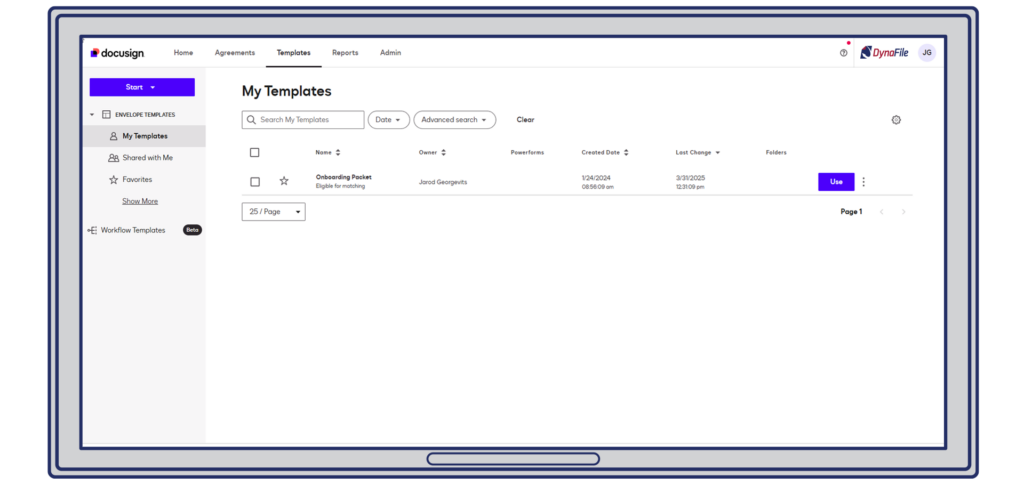
1. Create & Send Documents in DocuSign

First, log in to your DocuSign account and choose from reusable templates like W-4s, employee handbooks, or policy forms. Then fill in the necessary details, assign recipients, and send documents out for signatures.

Create & Send Documents in DocuSign

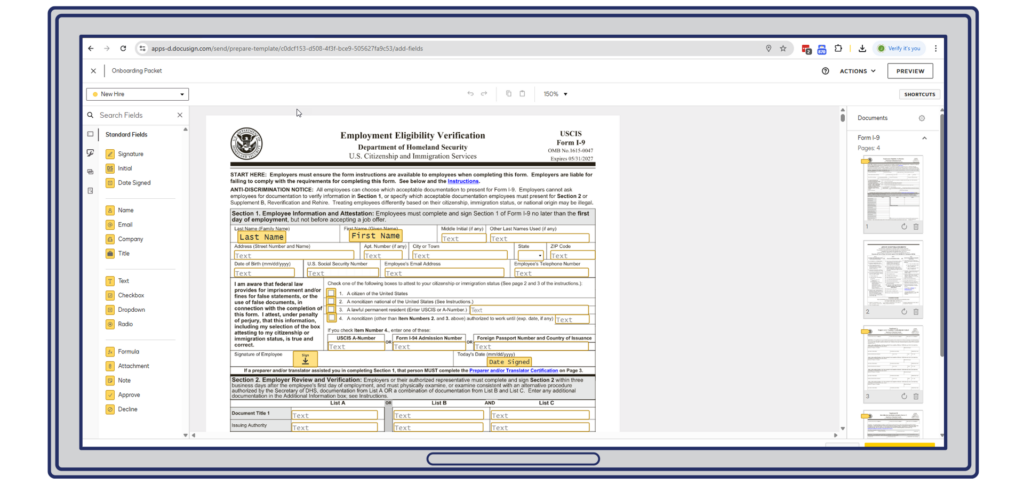
2. Add Required Fields for Seamless Signing

Next, use DocuSign’s drag-and-drop tools to add signature boxes, initials, dates, and checkboxes. These smart fields walk recipients through the form, so they complete everything correctly on the first try.

Add Required Fields for Seamless Signing

3. Automatically File in DynaFile

After signatures are complete, DynaFile stores each document in the correct employee folder—instantly and securely. There’s no need to rename, download, or upload files. Everything lands exactly where it belongs, already organized and audit-ready.

Automatically File in DynaFile


Real Results from Real Organizations


Fisher & Phillips

With 41 offices across the U.S., Fisher Phillips used DynaFile + DocuSign to eliminate manual HR processes and cut 5–7 hours of admin time per week. Secure, remote file access now allows their HR team to work more efficiently across locations.

“We began our DynaFile implementation a few weeks before COVID started. We wouldn’t have been able to work as effectively as we did during the pandemic without having our employee files digitized. DynaFile allowed us to transform not only how we work, but where we work.”
-Karen Hall  |  Director of Human Resources, Fisher Phillips

Get the Case Study >


San Diego Zoo Wildlife Alliance

This iconic organization went fully paperless by digitizing 100% of its employee records using DynaFile and DocuSign. Today, their HR team benefits from faster onboarding, streamlined document control, and full compliance—all without the filing cabinet.

“We can send out all of our onboarding paperwork online through DocuSign, have new-hires fill it out through DocuSign, have it sent back to us, and after it is approved, it’s archived in DynaFile’s storage cloud. With DynaFile’s segmented access controls we can now give Payroll access to just the documents they need. It’s quick, secure, easy — anyone can do it. On paper alone, the cost savings is in the thousands and possibly the hundreds of thousands when all is said and done.”

-Laura M. | Director of Human Resources, San Diego Zoo Wildlife Alliance

Get the Case Study >


Q&A: Common Questions About the Integration

What types of HR documents can I use with DynaFile + DocuSign?
You can automate signatures and filing for onboarding packets, policy acknowledgments, tax forms (W-4, I-9), training sign-offs, performance evaluations, and more.

Do I need to manually upload signed documents to DynaFile?
No. Once documents are signed via DocuSign, they are automatically stored in the correct DynaFile folder with no additional steps required.

Is this integration secure and compliant?
Yes. DocuSign provides legally binding, secure e-signatures. DynaFile enhances this with audit trails, role-based access, and expiration alerts for full compliance.

Can this integration support a remote or hybrid HR team?
Absolutely. Both DynaFile and DocuSign are cloud-based, allowing your team to manage documents securely from anywhere.


Why This Integration Matters Now

HR departments face rising expectations—faster hiring, better compliance, and fewer errors. Manual processes can’t keep up.

With DynaFile and DocuSign, you can remove bottlenecks, reduce risk, and get back hours each week. The result? A better experience for both HR teams and the employees they support.

DOWNLOAD THE WHITEPAPER

Ready to See It in Action?

Explore how DynaFile and DocuSign work together to eliminate manual filing, reduce risk, and modernize your HR workflows.

Whether you’re in healthcare, education, legal, manufacturing, or professional services, DynaFile and DocuSign can streamline HR document management across your entire organization.

Schedule a demo with DynaFile and learn how to transform your workflows and unlock the power of digital HR document management.

Filed Under: Digital Transformation, Electronic Filing, Paperless Onboarding, Record Compliance, Workflow Integrations

How to Simplify Your HR Document Management System with DynaFile and PandaDoc

March 26, 2025 by Andrew Roberts


Automate your HR workflows with DynaFile and PandaDoc

Streamline Hiring, Onboarding, and Compliance with an Automated HR Document Management System

“According to research by Deloitte, HR staff spend as much as 57% of their time on administrative tasks, leaving little time for more strategic work.”

If your HR department is still drowning in paperwork, uploading PDFs by hand, or hunting through folders before an audit, it’s time to reconsider your workflow.

Manual processes don’t just waste time—they create risk. The good news? There’s a better way.

With the plug-and-play integration between DynaFile and PandaDoc, you can create a streamlined, automated HR Document Management System that eliminates paperwork, boosts compliance, and gives your HR team valuable time back.

Why Manual HR Workflows Are No Longer Sustainable

The Problem: Too Much Admin, Not Enough Strategy

Even with a growing number of HR tools available, many organizations still depend on outdated processes to manage:

  • New hire paperwork
  • Benefits forms
  • Performance evaluations
  • Policy acknowledgments
  • Compliance documentation

These tasks are tedious and repetitive. And for remote or hybrid teams, they can be nearly impossible to manage efficiently.

A better system isn’t just a convenience—it’s a necessity.

The Solution: A Fully Integrated HR Document Management System

DynaFile + PandaDoc = End-to-End Automation

This integration connects two best-in-class platforms to deliver an easy-to-use, cloud-based solution for every step of the employee lifecycle.

Here’s what that looks like:

  • Build & Send with PandaDoc
    Create custom HR documents using PandaDoc’s dynamic templates—from offer letters to onboarding workflows.
  • Get Secure eSignatures
    Employees can fill and sign from anywhere, on any device. Forms are legally compliant and fast to complete.
  • Auto-File in DynaFile
    Once completed, documents are automatically routed to the correct employee folder in DynaFile—no uploading required.
  • Stay Audit-Ready
    With built-in HR compliance features, DynaFile alerts your team when documents are missing or expiring, keeping you prepared at all times.


Real Results: 100% Filing Efficiency at Paul Mitchell School

When the team at the Paul Mitchell School of Rexburg, ID sought to modernize its HR document process, they implemented DynaFile with PandaDoc—and the results were immediate.

“Having PandaDoc automatically import signed forms [into DynaFile] has been amazing. This saves us a ton of time.”
– Lindsey Yearsley, Financial Aid Leader

After adopting the integrated system, the team saw a 100% increase in filing efficiency. Their staff now benefits from remote access, automated workflows, and streamlined document management for education.

Visual Walkthrough: See It in Action

Here’s how your workflow looks with the integration in place:

1. Build & Send in PandaDoc

Use the dashboard and templates to send custom HR documents fast.

Build & Send in PandaDoc

2. Add Smart Fields

Drag and drop fields like name, date, and signature for seamless completion.

Add Smart Fields

3. Automatically File in DynaFile

Signed forms are instantly filed in the employee’s folder—secure, searchable, and organized.

Automatically File in DynaFile

It’s a complete HR Document Management System that reduces workload and increases confidence.

Why This Matters Now

HR teams are doing more with less. Whether you’re managing hiring, compliance, or HR onboarding document management, manual processes are no longer sustainable.

The DynaFile + PandaDoc integration offers an intuitive, reliable way to simplify operations, automate document workflows, and support a growing workforce without increasing administrative burden.

DOWNLOAD THE WHITEPAPER

Ready to Eliminate the Paper Chase?

If your HR department is ready to move faster, stay audit-ready, and reduce administrative drag, it’s time to go paperless.

Schedule a demo with DynaFile and discover a better way to manage HR documents from day one.

Filed Under: Paperless Onboarding, Record Compliance, Workflow Integrations

  • « Go to Previous Page
  • Page 1
  • Interim pages omitted …
  • Page 3
  • Page 4
  • Page 5
  • Page 6
  • Page 7
  • Interim pages omitted …
  • Page 12
  • Go to Next Page »

Footer

dynafile-footer

Dynafile gives your teams secure, immediate access to the documents they need, with automated scanning, effortless retrieval, refined segmentation, onboarding integrations, and customized compliance reporting in the cloud.

DEMO DYNAFILE
  • Company
    • Tour
    • Customers
    • Partners
    • Careers
    • Contact Us
    • Compliance & Certifications
    • Advocacy Program
    • Cookie Policy (EU)
  • Features
    • Meet AIDI
    • Cloud Workflows
    • Cloud Storage
    • Scanning Automation
    • Automated Onboarding Integrations
    • Seamless Integrations
  • Solutions
    • Human Resources
    • Education
    • Healthcare
    • Accounting
    • Contract Management
    • Manufacturing & Distribution
    • Real Estate
    • Staffing
    • Other Solutions
  • Resources
    • Case Studies
    • ROI Calculator
    • HR Guides
    • Press Releases
    • Blog
    • FAQs
© 2026 Blue Ribbon Technologies. All Rights Reserved. | Privacy Policy
Facebook linkedin youtube instagram twitter
  • Privacy Policy
  • Homepage
  • Landing Page
  • Tour
  • Solutions
    • Human Resources
    • Education
    • Healthcare
    • Accounting
    • Contract Management
    • Distribution
    • Real Estate
    • Staffing
    • Other Solutions
  • Features
    • Cloud Workflows
    • Scanning Automation
    • Cloud Storage
    • Automated Onboarding Integrations
    • Seamless Integrations
    • Meet AIDI – AI Document Intelligence by DynaFile
  • Company
    • Customers
    • Contact Us
    • Partners
    • Careers
    • History
    • Advocacy Program
    • Compliance & Certifications
  • Landing Page V1
  • Sandbox
  • Resources
    • Blog
    • FAQs
    • Press Releases
    • HR Guides
    • Case Studies
    • 2026 HR Challenges Research Study
    • ROI Calculator
  • DPA
    • 20211021
    • 20220722
  • Cookie Policy (EU)
  • DynaFile Quick Tour
  • Test Page
  • EULA
    • NPM
    • Page URL
    • URL
  • Explore DynaFile
  • DynaFile for HR
  • DynaFile for Education
  • Lead Referral Partner
  • DynaFile for Healthcare
  • Open Source
  • DynaFile for Manufacturing
  • Do More in Q4 WP Form Test
  • Calculator
  • Sitemap
  • 2025 HR Challenges Research Study Thank You
  • Home 2025 Backup
  • Compliance
  • Integrations
    • Paylocity
    • DocuSign
    • PandaDoc

  • Company
    • Tour
    • Customers
    • Partners
    • Careers
    • Contact Us
    • Compliance & Certifications
    • Advocacy Program
    • Cookie Policy (EU)
  • Features
    • Meet AIDI
    • Cloud Workflows
    • Cloud Storage
    • Scanning Automation
    • Automated Onboarding Integrations
    • Seamless Integrations
  • Solutions
    • Human Resources
    • Education
    • Healthcare
    • Accounting
    • Contract Management
    • Manufacturing & Distribution
    • Real Estate
    • Staffing
    • Other Solutions
  • Resources
    • Case Studies
    • ROI Calculator
    • HR Guides
    • Press Releases
    • Blog
    • FAQs
Manage Cookie Consent
To provide the best experiences, we use technologies like cookies to store and/or access device information. Consenting to these technologies will allow us to process data such as browsing behavior or unique IDs on this site. Not consenting or withdrawing consent, may adversely affect certain features and functions.
Functional Always active
The technical storage or access is strictly necessary for the legitimate purpose of enabling the use of a specific service explicitly requested by the subscriber or user, or for the sole purpose of carrying out the transmission of a communication over an electronic communications network.
Preferences
The technical storage or access is necessary for the legitimate purpose of storing preferences that are not requested by the subscriber or user.
Statistics
The technical storage or access that is used exclusively for statistical purposes. The technical storage or access that is used exclusively for anonymous statistical purposes. Without a subpoena, voluntary compliance on the part of your Internet Service Provider, or additional records from a third party, information stored or retrieved for this purpose alone cannot usually be used to identify you.
Marketing
The technical storage or access is required to create user profiles to send advertising, or to track the user on a website or across several websites for similar marketing purposes.
  • Manage options
  • Manage services
  • Manage {vendor_count} vendors
  • Read more about these purposes
View preferences
  • {title}
  • {title}
  • {title}