UKG Pro HR Document Management Integration
Connect UKG Pro employee data with DynaFile to centralize employee documents, reduce manual filing, and keep employee records secure and easy to retrieve.
One Employee. One Complete Record.
About the DynaFile UKG Pro Integration
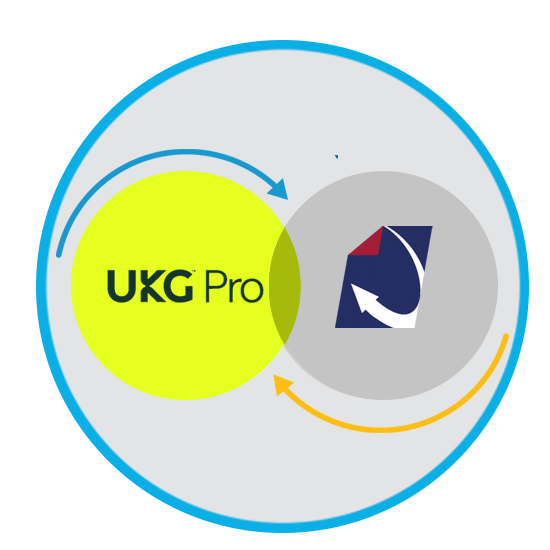
The DynaFile UKG Pro integration connects UKG Pro employee information with secure HR document management software. Together, the platforms help HR teams maintain organized digital employee files, reduce manual document handling, and improve audit readiness.
UKG Pro brings together HR, payroll, talent, and workforce management. DynaFile complements those processes by organizing, securing, and retrieving the documents behind the employee record, including onboarding paperwork, signed policy acknowledgments, and ongoing personnel documents.
Your HR Systems Manage People.
DynaFile Manages the Employee Record.
DynaFile gives HR teams using UKG Pro a consistent way to manage employee documents across departments and locations. Organize files by employee and document type, control access to sensitive information, and manage retention throughout the employee lifecycle. Keep the supporting documents connected to the employee information managed in UKG Pro.


Connecting UKG Pro Employee Data with Complete Employee Files
For HR teams using UKG Pro, keeping employee documents organized across systems, departments, and locations can still require significant manual work. Common challenges include:
- Onboarding paperwork, signed acknowledgments, and personnel documents scattered across shared drives, inboxes, and paper files
- Manual downloading, uploading, and filing between systemsInconsistent document naming and organization across departments and locations
- Difficulty identifying missing documents or retrieving complete employee files for audits
- Sensitive employee documents shared without appropriate access controls
The DynaFile UKG Pro integration connects employee information with structured, secure digital employee files. This gives HR teams a consistent way to organize and retrieve the documents associated with each employee, from onboarding through ongoing employment and separation.
The Solution: Connect UKG Pro with DynaFile Employee Document Management
The DynaFile UKG Pro integration connects employee information with a cloud-based HR document management system built to keep employee files organized, secure, and easy to retrieve.
Together, the platforms help HR teams manage employee data and the documents behind it:
- UKG Pro manages employee information and HR processes.
- DynaFile organizes, secures, and retains employee documents in structured digital files.
- HR teams reduce manual filing and maintain consistent employee records across departments and locations.
With onboarding paperwork, signed acknowledgments, and ongoing personnel documents organized in DynaFile, authorized teams can quickly retrieve the records they need for everyday HR requests, compliance reviews, and audits

How the UKG Pro and DynaFile Integration Works
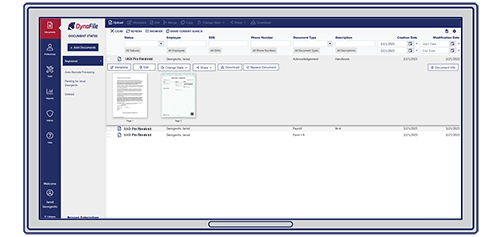
The DynaFile UKG Pro integration connects employee data with automated document filing. Employee information helps structure digital employee files, completed HR documents are filed in the appropriate employee record, and authorized teams can securely manage and retrieve those documents in DynaFile.
1. Connect UKG Pro Employee Data with DynaFile Records
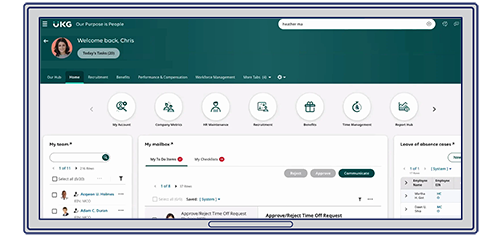
Employee information from UKG Pro helps organize digital employee files in DynaFile. Employee identifiers and mapped data fields associate documents with the correct employee record, helping HR teams maintain consistent files across departments and locations.
3. Secure, Manage, and Retrieve Employee Records
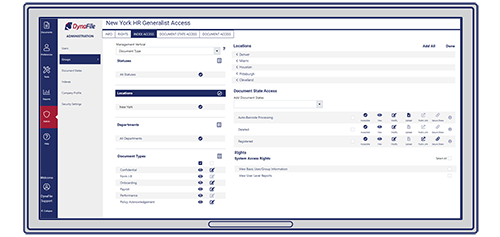
DynaFile provides role-based access controls and document-level permissions so authorized teams can access the employee documents they need while protecting sensitive information. Consistent indexing helps HR quickly find records for employee requests, compliance reviews, and audits. Audit trails track document activity, and retention tools help manage how long employee documents are kept throughout the employee lifecycle.
Download the UKG Pro Integration Overview
See how DynaFile connects UKG Pro employee information with automated document filing, secure employee records, and tools for document retrieval, access control, and retention.


Streamline Employee Document Management Across Your UKG Pro Organization
When HR responsibilities span multiple departments and locations, employee files need a consistent structure. The DynaFile UKG Pro integration helps reduce manual filing and brings onboarding and ongoing personnel documents into organized employee records that authorized teams can access.
- Bring new hire paperwork into the employee record: Automatically file completed UKG Pro onboarding documents, including W-4 forms, I-9 documents, and direct deposit forms, in the corresponding DynaFile employee file.
- Keep signed policies connected to each employee: Organize handbook acknowledgments and company or location-specific policy documents by employee and document type.
- Maintain documentation as roles change: Keep offer letters, job descriptions, and signed employment agreements together so HR can retrieve the paperwork associated with an employee’s role.
- Standardize files across departments and locations: Use consistent document indexing and organization so teams can find personnel records without navigating different local filing practices.
- Prepare records for reviews and audits: Retrieve relevant employee documents for a department, location, or individual while using DynaFile permissions to control access to sensitive records.
- Manage retention beyond active employment: Apply DynaFile retention schedules to keep and dispose of employee documents according to your organization’s policies.

Help HR Teams Work from a Consistent Employee Record
Connecting UKG Pro with DynaFile helps teams across your organization spend less time handling documents and respond more efficiently to employee records requests.
- HR operations: Reduce repetitive downloading, uploading, and filing so teams can focus on employee needs.
- Local HR teams: Find onboarding paperwork, signed acknowledgments, and personnel documents using a consistent file structure across locations.
- Compliance and audit teams: Retrieve organized employee records for reviews without collecting documents from multiple departments.
- HR leadership: Establish consistent document management practices as business units, locations, and employee populations grow.
- System administrators: Manage access by role and document type so each team can retrieve the records appropriate to its responsibilities.



Employee File Management That Fits Your UKG Pro Environment
Your organization may share one HR platform while departments and locations have different document requirements. DynaFile brings consistency to employee records while allowing file organization, access, and retention to reflect those needs.
- Build around UKG Pro: Connect employee document management with the employee information and HR processes your teams already use.
- Organize records your way: Customize document types and indexing fields to reflect your departments, locations, and employee file requirements.
- Give teams appropriate access: Set role-based and document-level permissions for central HR, local teams, and other authorized users.
- Apply retention policies in DynaFile: Manage document retention schedules according to your organization’s policies and applicable requirements.
As your organization adds employees or locations, DynaFile provides a consistent structure for managing employee documents alongside UKG Pro.
UKG Pro and DynaFile Integration FAQs
Q: What does DynaFile add to UKG Pro?
A: DynaFile adds dedicated HR document management alongside UKG Pro. It brings onboarding paperwork, signed acknowledgments, and ongoing personnel documents into structured digital employee files, with tools for document search, access control, audit trails, and retention.
Q: How do UKG Pro and DynaFile work together?
A: UKG Pro manages employee information and HR processes. DynaFile provides a dedicated platform for organizing, securing, and retrieving the supporting employee documents. Together, they help HR teams keep employee data and document management connected throughout the employee lifecycle.
Q: What types of employee documents can HR teams manage in DynaFile?
A: HR teams can manage onboarding paperwork, offer letters, job descriptions, signed policy and handbook acknowledgments, and ongoing personnel documents in DynaFile. Files are organized by employee and document type so authorized users can find the records they need.
Q: Can different departments and locations have different access permissions?
A: Yes. DynaFile provides role-based access controls and document-level permissions. Organizations can give central HR, local HR teams, and other authorized users access to the records needed for their responsibilities while restricting sensitive documents.
Q: How does DynaFile help UKG Pro users prepare for employee records audits?
A: DynaFile keeps employee documents indexed and searchable so authorized teams can retrieve records for an individual, department, or location. Audit trails track document activity, and retention tools help HR manage records according to organizational policies.
Q: Does DynaFile replace UKG Pro?
A: No. UKG Pro continues to manage employee information and HR processes. DynaFile complements it by managing the supporting employee documents throughout onboarding, employment, and separation.
Using UKG Pro?
Give Your HR Teams a Complete Employee Record.
Bring employee documents into organized, secure digital files with DynaFile. Help teams across departments and locations find the records they need with access appropriate to their responsibilities.
See how DynaFile can complement your UKG Pro environment in a personalized demo focused on your employee document needs.