
Docusign Integration for Automated Employee Document Management
Connect DynaFile with Docusign to send, sign, and automatically store employee documents in secure, structured employee folders without manual uploads or filing.
Onboarding Should Not Drain Your HR Team’s Time
Even with digital tools in place, many HR teams still rely on manual processes to manage onboarding and employee documentation. Printing, scanning, chasing signatures, and manually uploading files create unnecessary bottlenecks and increase compliance risk.
DynaFile and Docusign automate the employee document lifecycle from signature to secure storage, giving HR teams time back while strengthening document control.


The Document Workflow Gap in HR
Common challenges include:
- Chasing signatures for onboarding packets and policy acknowledgments
- Manual downloading and uploading of completed forms
- Storing signed documents across shared drives and inboxes
- Limited visibility into document completion status
- Increased compliance risk from missing or misfiled records
Without structured document management, even digitally signed forms can become fragmented and difficult to track.

The Solution: A Seamless Integration Between DynaFile and Docusign
DynaFile integrates directly with Docusign to deliver a plug-and-play workflow that simplifies how HR teams send, sign, and securely store employee documents.
Instead of downloading completed forms and manually filing them, signed documents are automatically routed into the correct employee folder within DynaFile.
This integration supports onboarding, benefits enrollment, policy acknowledgments, performance documentation, and compliance tracking within one centralized system.

How the Docusign Integration Works
The Docusign document management integration creates an automated bridge between Docusign and DynaFile, connecting electronic signatures directly to structured employee document storage without disrupting HR workflows.
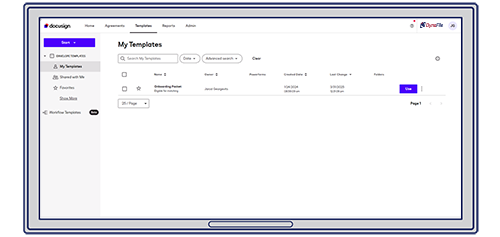
1. Prepare and Send with Docusign
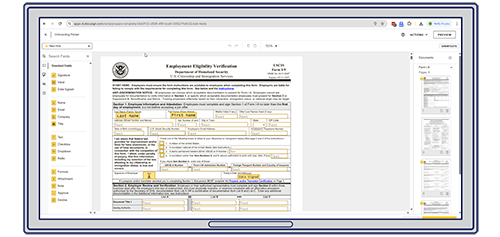
HR teams begin within Docusign, using templates or reusable forms such as W-4s, employee handbooks, or policy acknowledgments. Fields for names, dates, initials, and required sign-offs are easily configured before sending to recipients.
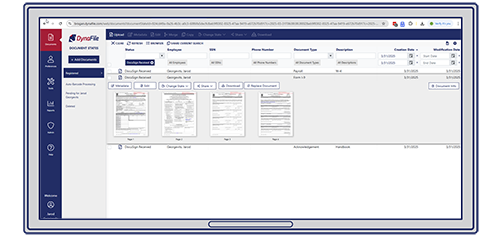
3. Signed Documents Are Automatically Filed in DynaFile
Once signed, documents are automatically routed to the appropriate employee folder in DynaFile. Files are securely stored, indexed by employee and document type, and available instantly with full audit visibility.
Download the Docusign Integration Overview
Download the integration whitepaper to see how DynaFile connects with Docusign to automate document routing, centralize employee records, and strengthen compliance controls from signature to storage.

Designed for Compliance, Security, and Remote Teams
The DynaFile and Docusign integration ensures:
- Signed and unsigned documents are stored together in structured employee folders
- Automatic alerts for missing or expiring documentation
- Detailed audit trails for document activity
- Role-based access controls for HR, payroll, and leadership teams
- Secure remote access across multiple locations
HR teams gain a fully digital onboarding and document management workflow that scales as the organization grows.

Real-World Success with DocuSign and DynaFile
Organizations across industries use the DynaFile DocuSign electronic signature integration to eliminate manual filing, accelerate onboarding, and maintain secure, audit-ready employee records.

San Diego Zoo
Nonprofit | DocuSign Integration
Eliminated paper files and created a fully digital, audit-ready HR document management environment.
Read the Full Case Study >

Fisher & Phillips LLP
Legal | DocuSign Integration
Saved 5–7 hours per week in administrative workload and enabled secure remote HR document access.
Read the Full Case Study >

Quick. Secure. Easy.
We can send out all of our onboarding paperwork online through Docusign, have new-hires fill it out through Docusign, have it sent back to us, and after it is approved, it’s archived in DynaFile’s storage cloud. With DynaFile’s segmented access controls, we can now give Payroll access to just the documents they need. It’s quick, secure, easy — anyone can do it.
Frequently Asked Questions About the Docusign Integration
Q: Does the integration require a complex setup?
A: No. The integration is designed to work alongside your existing Docusign workflows without disrupting HR operations.
Q: Are signed documents automatically stored in employee folders?
A: Yes. Once documents are completed in Docusign, they are automatically routed to the appropriate employee folder within DynaFile.
Q: Can this support multi-location or remote HR teams?
A: Yes. Secure cloud storage and role-based permissions allow distributed teams to manage employee documentation confidently from anywhere.
Ready to Automate Docusign Document Filing?
If your organization uses Docusign, ensure signed HR documents are automatically stored, indexed, and secured within a structured employee document management system.
Schedule a personalized demo to see how the DynaFile Docusign integration works in your environment.